
How to Create Your Logo with AI in 2025: The Complete Guide to Building Your Brand Identity
Your logo is more than just a symbol — it’s the face of your brand. In 2025, creating a logo with AI is easier, faster, and smarter than ever before. Thanks to artificial intelligence, even non-designers can now build a stunning, professional-quality logo that perfectly represents their business or personal brand in just a few clicks.
Let’s explore how you can create your own logo with AI, step-by-step.
Understanding AI Logo Creation
What Is an AI Logo Generator?
An AI logo generator is a tool that uses machine learning and design algorithms to create custom logos based on your input — such as your brand name, industry, and color preferences. It eliminates the need for graphic design expertise.
How AI Simplifies the Logo Design Process
Traditional logo design involves multiple drafts, designer communication, and revisions. AI streamlines this by instantly generating hundreds of design variations, allowing you to choose and customize in real-time.
Why Create a Logo with AI?
Speed and Accessibility
AI logo tools create logos in minutes, not days. You can generate ideas instantly, refine them, and finalize your logo without waiting on a designer.
Cost-Effective Branding Solution
Hiring a professional designer can cost anywhere from $200 to $2,000. With AI, you can create a high-quality logo for as little as $10–$50, making it ideal for startups and entrepreneurs.
Limitless Creative Possibilities
AI logo makers use vast design libraries to combine fonts, colors, and icons creatively, giving you endless variations and inspiration.
Step-by-Step Guide: How to Create Your Logo with AI on Centralix
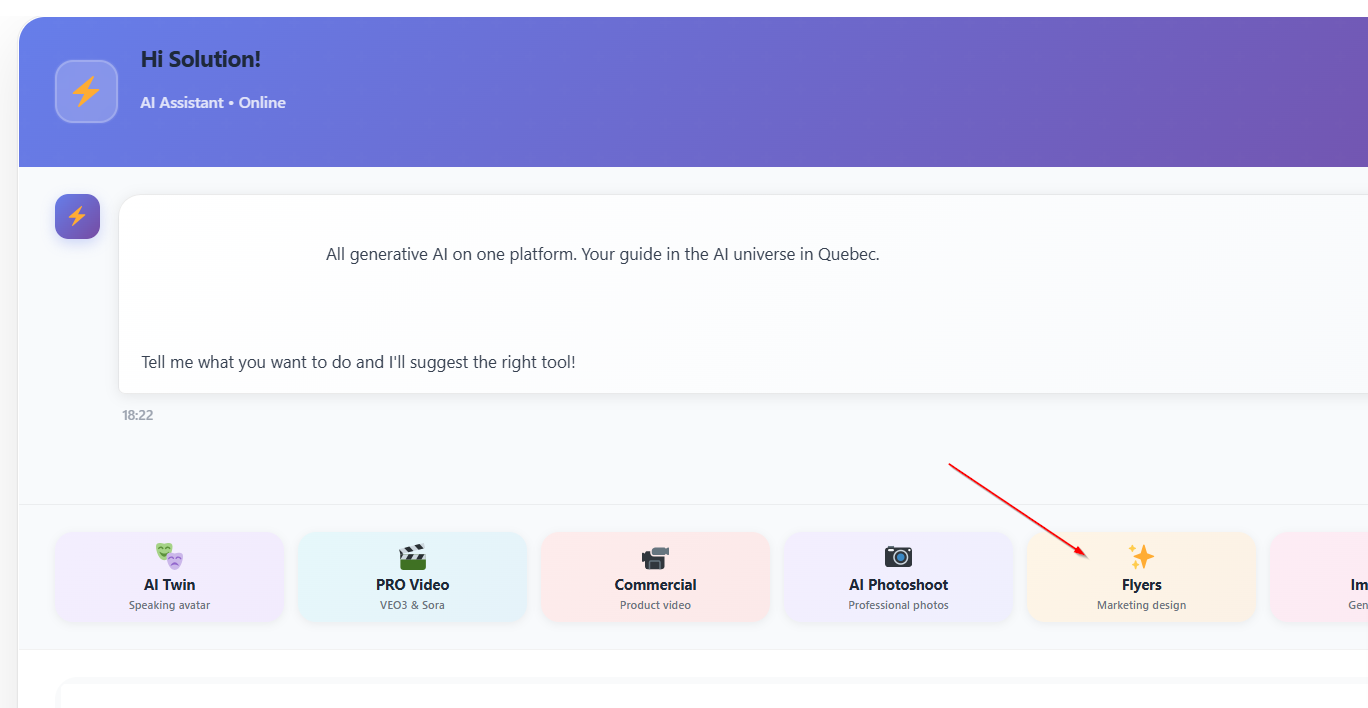
Step 1: Access Centralix Home Page
Once you are on Centralix home page, you can choose the option Flyer generator or use ask it directly to the AI agent.
Step 2: Craft a small description of your brand
Craft a small description of your brand that you will send to the AI agent for generation.
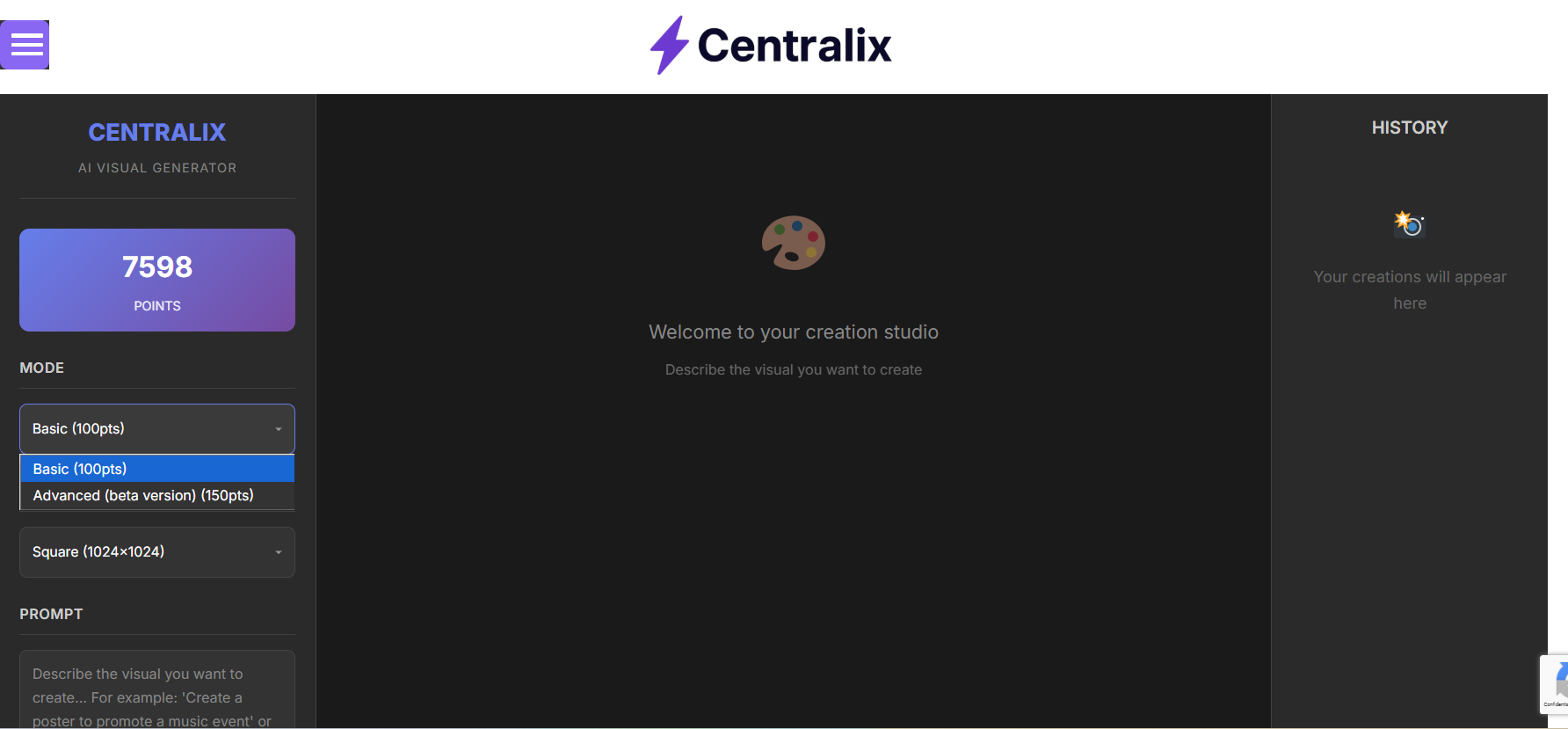
Step 3: Choose between basic and advanced
The difference bewteen basic and advanced is that, the basic gives you a fast generated logo created 100% from AI meanwhile the advanced, takes inspiration all over the web and could be longer.
Step 4: Pick Design Styles, Colors, and Icons
Select from various moods (minimal, bold, elegant, etc.) and color palettes. AI tools use color psychology to align your design with your brand’s emotion.
Step 5: Let the AI Generate Logo Options
Click “Generate”, and watch the AI instantly create dozens of unique logo variations tailored to your preferences.
Step 6: Customize Your Favorite Design
Once you’ve chosen a base logo, fine-tune fonts, icon placement, and spacing. Most AI tools allow manual edits for full control.
Step 7: Download and Use Your Logo Across Platforms
After finalizing, download your logo in high-resolution formats (PNG, SVG, or PDF). Use it on websites, business cards, and social media branding.
Top AI Tools for Creating Logos in 2025
| Tool | Best For | Price Range |
|---|---|---|
| Looka | Startups & small businesses | $20–$80 |
| Brandmark | Tech and digital brands | $25–$65 |
| Designs.ai | All-in-one brand kits | $19–$49 |
| Canva AI Logo Maker | Beginners & creatives | Free–$12/mo |
| Wix Logo Maker | Website integration | $20–$50 |
Each of these platforms uses advanced algorithms to balance color harmony, typography, and visual impact, ensuring your logo looks both modern and professional.
Tips for Designing a Memorable AI-Generated Logo
-
Keep it simple: Clean designs are timeless and more versatile.
-
Choose meaningful colors: Blue conveys trust, red shows passion, and green symbolizes growth.
-
Test scalability: Your logo should look great on everything — from business cards to billboards.
-
Stay consistent: Match your logo style with your brand’s tone and visuals.
Common Mistakes to Avoid When Creating Logos with AI
-
Overcomplicating the design – Too many colors or fonts confuse the viewer.
-
Ignoring brand identity – Don’t let AI choose everything. Guide it with your vision.
-
Skipping manual refinement – AI generates the base; human creativity polishes it.
AI vs. Human Designers: Which Is Better?
While AI excels in speed and variety, human designers still offer deep emotional storytelling and originality. The best solution often lies in combining both: AI for ideas, humans for refinement.
How AI Understands Branding Psychology
AI analyzes successful logos and visual psychology to ensure your design triggers the right emotions:
-
Shapes: Circles represent unity, triangles imply power, and squares show stability.
-
Colors: Each color communicates specific brand traits, helping you connect subconsciously with audiences.
Legal Considerations: Logo Ownership and Licensing
When using AI, ensure the generated logo is unique and copyright-free. Most premium AI logo makers provide full commercial usage rights upon purchase, guaranteeing ownership.
Future of AI in Logo Design
In the near future, AI will evolve into real-time brand identity systems, capable of generating complete visual identities — including color palettes, typography, and motion graphics — all consistent with your brand story.
FAQs: How to Create Your Logo with AI
1. Can I use AI logos commercially?
Yes, as long as you use a licensed tool that grants commercial rights.
2. Do I need design experience?
No. AI tools handle the design, so you can focus on creativity and strategy.
3. How long does it take to create a logo with AI?
Typically between 5–10 minutes from idea to final download.
4. Can I edit the AI-generated logo?
Absolutely! Most tools let you customize fonts, colors, and layout after generation.
5. Are AI-generated logos original?
Yes, each logo is generated uniquely based on your brand’s input.
6. Which AI tool is best for beginners?
Canva AI Logo Maker and Looka are both user-friendly and professional.